Your cron jobs are failing. You just don't know it yet.
Add one line to any script. CronDash watches for the heartbeat. If it stops, you get a Slack message or email in under 60 seconds.
3 monitors free forever · no card required
Works with every stack





Set up in 90 seconds. Never miss a job again.
No agents. No SDKs. No dashboards to babysit. One curl line and you're covered.
Know before your users do
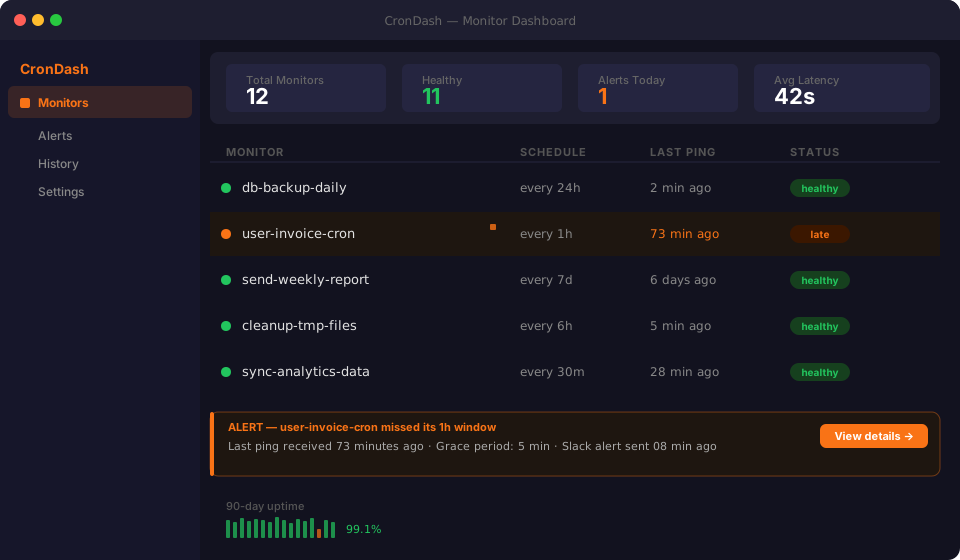
If a job misses its window, CronDash fires a Slack or email alert in under 60 seconds — not three hours later when a customer notices.
One curl line. That's it.
Add curl https://crondash.dev/ping/YOUR_KEY at the end of any script. Bash, Python, Node, Ruby, Go — anything that can run curl works instantly.
Spot drift before it breaks
See every run: duration, exit code, last success, consecutive failures. Catch a job slowing down weeks before it misses a deadline.
Smart grace periods — no false alarms
Set an expected interval and a grace window. CronDash only pages you when the job is genuinely late, not on every 2-second network hiccup.
All your infra, one dashboard
Organise monitors by project or server. VPS, Coolify apps, Railway, GitHub Actions, local machines — all watched from a single view.
Zero exposure by design
Ping URLs are 24-character random tokens — not guessable, never listed publicly, rotatable any time. Your job names stay private.
Running in 90 seconds
Create a monitor
Name it, set the expected interval (e.g. every 1 hour), and pick your grace period. CronDash generates a unique ping URL.
Add one line to your cron job
At the end of your script: curl -s https://crondash.dev/ping/abc123 or use our Python / Node snippet. That's the entire integration.
Get alerted when it stops
If the ping stops arriving on time, CronDash sends you an alert via Slack or email. Fix the job, not the dashboard.
Two lines. The entire setup.
Add one curl line at the end of your script. CronDash does the rest.
            #!/bin/bash
# Daily database backup
pg_dump mydb | gzip > /backups/db-$(date +%Y%m%d).gz

# ← no one knows if this stopped working
            #!/bin/bash
# Daily database backup
pg_dump mydb | gzip > /backups/db-$(date +%Y%m%d).gz

# Ping CronDash — alerts you if this stops running
curl -s https://crondash.dev/ping/abc123xyz > /dev/null
Simple, transparent pricing
Start free, upgrade when you're ready.
For solo developers. 3 monitors, free forever.
What's included
- 3 monitors
- Email alerts
- 7-day history
- 1-minute check frequency
- No credit card required
For developers who depend on their jobs running.
What's included
- Unlimited monitors
- Email + Slack alerts
- 90-day history
- 30-second check frequency
- Webhook alerts
- Multiple team members
From developers who've been burned
"My nightly billing job silently failed for 4 days. Found out from an angry customer. CronDash would have caught it in under a minute. Setup took me literally 30 seconds."
"I used to tail logs on my VPS every morning to check if the overnight jobs ran. Now I wake up and if there's no alert, I know everything's fine. Game changer for solo devs."
"The one-line curl integration is genius. Took me longer to read the docs than to actually set it up. I have 7 monitors running across three different servers now."
"Tried Datadog for this — complete overkill and $80/mo for a feature I use 1% of. CronDash is exactly the right scope. Does one thing perfectly."
Common questions
One ping URL = one monitor. Each background job that you want to watch needs its own monitor. The free plan covers 3 monitors; Pro covers unlimited.
You set the expected interval (e.g. every 1 hour) and a grace period (e.g. 5 minutes). If CronDash doesn't receive a ping within interval + grace, it fires an alert.
Yes — any recurring process works: GitHub Actions workflows, Kubernetes CronJobs, Heroku Scheduler, Railway deployments, or a Python script you run manually.
Email and Slack on all plans. Webhook (POST to your endpoint) on Pro. PagerDuty integration is on the roadmap.
Each URL is a 24-character random token. It's not guessable, not listed anywhere public, and you can rotate it any time.
Stop finding out from users. Start monitoring today.
3 monitors free forever — no credit card, setup in under 2 minutes.
Get free early accessFree forever for 3 monitors · no card required